- AI Transformation
- Services
- Works
Other projects
AI Learning PersonalizationSmart content recommendationsHotel AI ConciergeAI assistant for hotel guestsClaims Documentation AutomationPlatform for faster claims processingAI for Candidate ScreeningSmart HR efficiency boosterAI Voice AgentAI agent for hands-free learningLLM Legal SummarizationEfficient and fast legal summariesVision-Based Driving AssistanceReal-time threat detection system - Company
Yellow in Numbers
$2.1B+
Value generated through AI innovation47
Custom LLMs and AI agents deployed30M+
Engaging with products we created98%
Projects delivered within agreed budget


Key Takeaways
Chatbots, AI assistants, and AI agents are often treated as the same thing when they are not. The difference comes down to how much they can actually do on their own.
A chatbot mostly talks. An AI assistant helps you with tasks when you ask. An AI agent can plan, decide, and act across multiple steps with limited supervision.
Picking the wrong one wastes money. A simple FAQ problem doesn’t need an autonomous agent, and a complex workflow will jam a basic chatbot.
Most real products blend these categories. The line between them is blurrier than vendors sometimes admit.
The right choice depends on your problem, your data, and how much independence you're comfortable giving a piece of software.
Let’s create your perfect smart software together!
The terms get thrown around like they mean the same thing. Someone builds a customer support widget and calls it an "AI agent." Someone else launches an FAQ tool and labels it an "intelligent assistant." Then a third person uses "chatbot" to describe a system that can book flights, update databases, and email your accountant. And then they ask why the buyers are confused.
These words really are used interchangeably across the industry, and that misunderstanding has a cost. If you don't understand what separates a chatbot from an assistant and an assistant from an agent, you can easily overpay for a capability you'll never use, or worse, underbuy and end up with a tool that simply doesn’t work.
Today, we’ll sort it out. We'll define each category, look at how they work, walk through real use cases, and compare them side by side. By the end, you should be able to look at any "AI" product and roughly place it in the right bucket. You'll also get practical guidance on which one fits your situation, because that's the part most explainers skip.
What Are AI Chatbots?
We’re going to start with the simplest one. A chatbot is software designed to talk to users. You type something, it responds, and the back-and-forth continues. The earliest versions followed strict rules and decision trees, but modern ones often use natural language processing and, increasingly, large language models to sound more human and handle more vague input.
But that’s it. Chatbots answer questions, guide users, and route requests, but they can’t take more complex actions. When they need to actually do something, like process a refund or change an order, they usually hand it off to another system or a human.

That doesn’t mean that chatbots are bad. Plenty of business problems are conversation problems. A customer wants to know your return policy. Or someone forgot their store hours. Or a user needs to find the right page on your site. A well-built chatbot solves these quickly and cheaply, and it doesn't need to be smarter than that.
Types of Chatbots
There are three base categories worth knowing:
Rule-based chatbots: These follow predefined scripts and decision trees. You click a button or pick from menu options, and the bot responds with a set answer. Predictable and cheap, but pretty limited.
NLP-based chatbots: These understand natural language to a degree, so users can type freely instead of choosing from buttons. They handle variation better but still operate within a defined knowledge scope.
Generative chatbots: Powered by large language models, these generate responses on the fly instead of pulling from a fixed script. They feel far more natural. But they can also hallucinate, which is a real problem when accuracy matters.
Many modern conversational AI products mix these approaches. A bot might use scripted flows for sensitive tasks and generative responses for casual questions. That hybrid setup is usually smarter than going all-in on one method.
Advantages and Limitations of Chatbots
The advantages are easy to list. Chatbots are relatively cheap to build, fast to deploy, and great at handling high volumes of repetitive questions. They work around the clock without complaint. For a support team drowning in the same five questions, a chatbot is a relief.
Still, the limitations are just as clear. A chatbot's intelligence is shallow. It doesn't remember much, doesn't plan, and can't chain together multiple steps to reach a goal. If you try to push it past its scripted boundaries, it either fails politely or, with generative models, confidently makes something up. The second failure mode is truly unsettling. Yes, it’s annoying to get rejected by a bot, but when it invents a refund policy that doesn’t exist, it becomes dangerous.
Use Cases of Chatbots
Chatbots fit best where conversations are predictable and high-volume:
Customer support for common questions
Lead capture and qualification on websites
Appointment scheduling and basic booking
Order status checks
Internal FAQ tools for employees
If your problem looks like "people keep asking the same things and we want quick answers," a chatbot is probably enough. You don't need to overthink it. Investing in chatbot development for these scenarios usually pays off quickly because the scope stays manageable.
What Are AI Assistants?
An AI assistant helps you complete tasks, usually in response to your request. Think Siri, Alexa, Google Assistant, or the copilot features now baked into office software. You ask, it helps. Set a reminder, draft an email, summarize a document, pull up a report. The assistant can do all of that, but only when you tell it to.

The difference between an AI assistant and an AI agent trips people up constantly, so let's be careful. Assistants usually connect to a few tools and data sources. That's what makes them useful beyond conversation. An assistant can read your calendar, access your files, or trigger a specific function. Because of that, the difference between an AI assistant and an AI agent can trip people up, so you should be careful. An assistant is reactive. It waits for you to ask, then helps with the thing you asked for. It can be quite capable inside that request, but it generally stays in its lane and checks back with you often.
Types of AI Assistants
There are plenty of AI assistant types, but here are the ones you should definitely know:
Voice assistants: You can see (or, well, hear) them in smart speakers and phone assistants. They handle spoken commands for everyday tasks.
Productivity assistants: Tools embedded in software that help you write, summarize, schedule, or analyze. The copilot features in document and email apps fall here.
Domain-specific assistants: Built for a particular field, like a coding assistant that suggests code, or a sales assistant that drafts outreach and logs activity.
Some of the most useful assistants today pull from your own knowledge base using techniques like RAG, so the answers are grounded in your actual documents rather than generic guesses.
Use Cases of AI Assistants
Assistants work best when a person is in the loop and wants to move faster:
Drafting and editing emails or documents
Summarizing long reports or meeting notes
Answering questions over internal company knowledge
Helping developers write/explain code
Supporting sales reps with research/follow-up drafts
The common thread is a productivity boost. The assistant doesn't remove the whole person, only friction from their work. For a lot of businesses, that's exactly the right level of help.
Advantages and Limitations of AI Assistants
The big advantage is practical value with low risk. Because a human stays in control, mistakes get caught before they cause damage. That makes assistants a comfortable entry point for companies nervous about handing too much over to software. They're also flexible. A good assistant handles a wide range of requests within its domain, and modern large language models make them feel genuinely helpful.
The limitations come from that same dependence on you. An assistant won't take initiative. It won't notice a problem at 2 am and fix it. It won't run a five-step process on its own and report back. Every meaningful action needs your prompt. For routine help, that's fine, but for workflows you'd like to fully offload, it’s not enough.
What Are AI Agents?
An AI agent is smart software that can pursue a goal with limited supervision. There’s no need to tell it every step. You tell it what outcome you want, and it figures out how to get there, taking actions, using tools, and adjusting as it goes. Right now, this is definitely the category that gets the most hype. Whether all of it is deserved is another question.
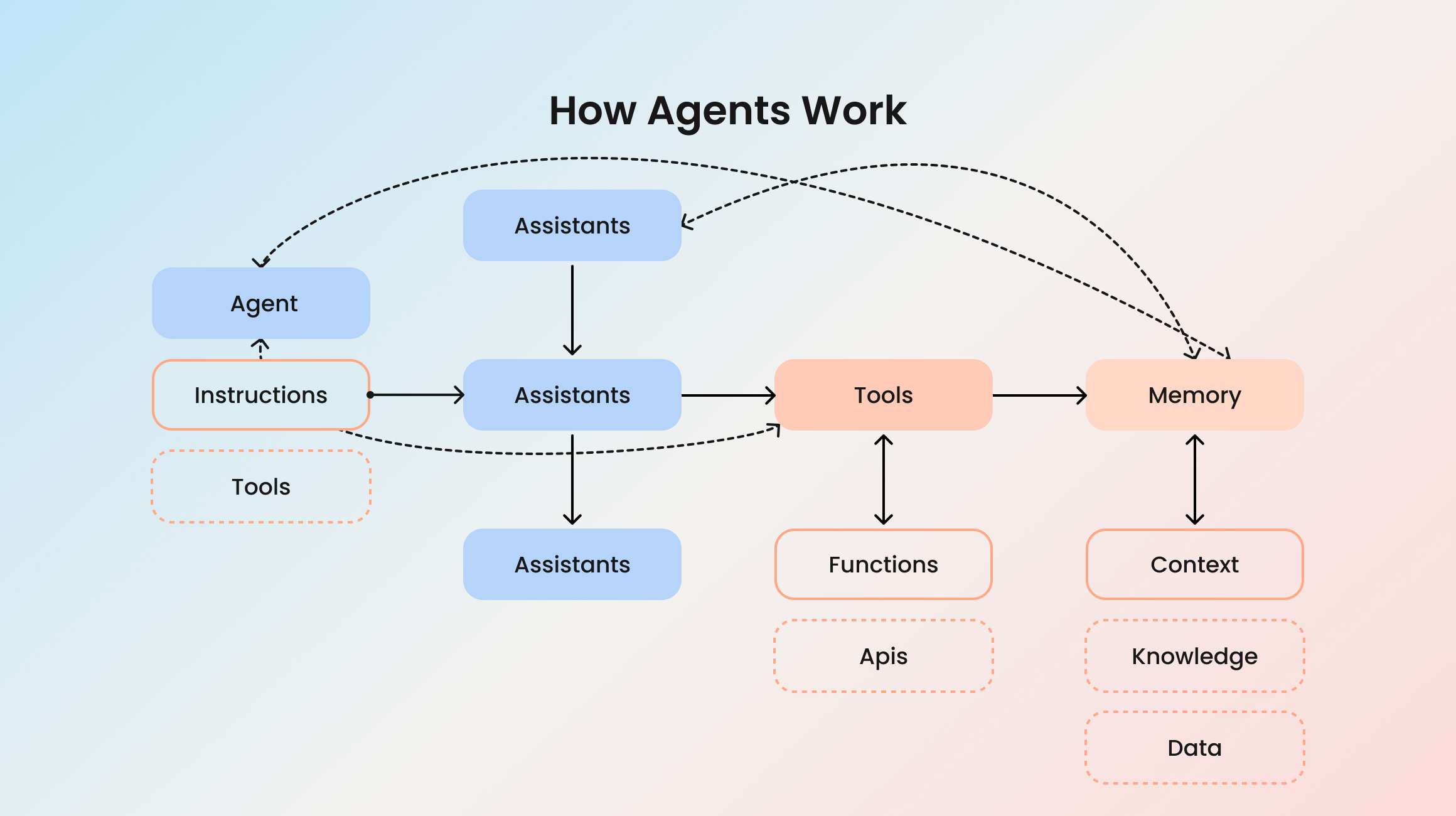
The difference between AI agents and chatbots is the clearest of all three comparisons. A chatbot responds, and an agent acts. An agent can break a goal into sub-tasks, call APIs, query databases, evaluate results, and decide what to do next. It operates in a loop: observe, decide, act, check, repeat. That loop is what makes it an agent rather than a fancy chatbot.
There's something impressive about a system that can churn through a multi-step task without hand-holding. But some people may find an independent piece of software that makes decisions while nobody's actively watching a bit unsettling. Serious AI agent development takes that tension seriously, building in guardrails, logging, and human checkpoints for anything risky.
Types of AI Agents
Again, there are many ways you can differentiate AI agents, but the main categories include:
Simple reflex agents: Use sensors to “see” the environment, then apply a set of condition‐action rules.
Task-specific agents: Built to handle one workflow well, like processing invoices or triaging support tickets end to end.
Goal-based agents: Pay attention to their goal, which is a description of what state of the environment they should achieve.
Multi-step workflow agents: These chain several tasks together, so a process goes from start to finish across multiple systems.
Learning agents: Improve their performance based on previous feedback, interactions, and instructions.
Multi-agent systems: Several agents working together, each with a role, coordinating to complete bigger jobs. Powerful, but also harder to control and debug.
Most agents lean on large language models for reasoning and language, then connect to tools and data to actually do things. The model is the brain, and the tools are the hands.
Use Cases of AI Agents
Agents fit when a goal involves multiple steps, decisions, and system interactions:
Resolving customer issues that require looking up records, checking policy, and taking action
Automating back-office workflows like data entry, reconciliation, or reporting
Research tasks that involve gathering, comparing, and synthesizing information
Managing parts of a sales or onboarding pipeline with minimal manual input
This is the pinnacle of AI automation. Instead of a human triggering each step, the agent handles the chain. Done well, it saves serious time. Done poorly, it makes mistakes at scale, which is worse than no automation at all.
Curious who's actually building serious agent systems right now?
See Top AI Development CompaniesAdvantages and Limitations of AI Agents
The advantage is autonomy. An agent can own a workflow and free people from repetitive multi-step work entirely. For the right problem, that's transformative. It's a different category of value.
The limitations are serious, too. Agents are harder and more expensive to build. They're harder to test, because their behavior isn't fully predictable. They can drift mid-task, take a wrong turn, and still present the result like everything went fine. And the more autonomy you give them, the higher the stakes when something goes wrong.
That's why good AI implementation for agents includes strict boundaries: clear limits on what the agent can/can’t do without approval, solid logging, and human checkpoints for anything sensitive. Building an agent that can move money or delete records without oversight is a really bad decision.
AI Chatbot vs AI Assistant vs AI Agent: Comparison
The whole AI assistant vs chatbot vs AI agent debate becomes much clearer when you line them up by what they can do.
| Aspect | Chatbot | AI assistant | AI agent |
|---|---|---|---|
| Core job | Conversation | Helping with tasks on request | Pursuing goals independently |
| Initiative | None | Low | High |
| Memory & context | Limited | Moderate | Strong, tracks multi-step state |
| Human involvement | High | Medium, you approve | Low, supervision by exception |
| Build complexity | Low | Medium | High |
| Best for | Repetitive Q&A | Boosting human productivity | Automating full workflows |
| Risk if it fails | Low | Low to medium | Medium to high |
How to Choose the Right Solution
The difference between these tools only counts if it helps you pick the right one. So let's get practical.

Start with the problem. Write down what you're trying to achieve in plain language. "Answer common customer questions" points to a chatbot. "Help our team write reports faster" points to an assistant. "Handle the refund process without a human" points to an agent. The problem statement usually reveals the answer before you talk to a single vendor.
Match the capability to your need. It's tempting to buy the most advanced option because agents sound exciting. Resist that. If your problem is a conversation problem, an agent is overkill, expensive, and harder to maintain.
Consider how much independence you're comfortable with. This is partly a technical question and partly a trust question. Are you ready to let software take actions without a person approving each one? For low-risk tasks, sure. For anything touching money, customer data, or legal commitments, slow down and keep a human in the loop.
A few rules of thumb:
High-volume, predictable questions → chatbot
Helping people work faster on varied tasks → assistant
Full multi-step workflows you want to offload → agent
Not sure yet → start smaller, prove value, then scale up
Think about data and integration early. Assistants and agents are only as good as what they can access. If your data is messy/locked in silos, even the most well-designed agent will struggle.
And don't ignore maintenance! All three need upkeep, but agents need the most. Who monitors it? Who fixes it when behavior drifts? Build that cost into your decision from the start. Many projects look cheap until you account for the long, unglamorous middle.
The Future Of Smart Tech
The lines between these categories will keep dissolving. Already, the tidy distinctions feel a bit dated. Chatbots are gaining agent-like abilities. Assistants are taking more initiative. Agents are getting better at conversation. Within a few years, most people probably won't think about which bucket a product falls into. They'll just expect software to understand them and get things done.
Generative AI is the engine behind most of this convergence. The same underlying models power smarter chatbots, more capable assistants, and reasoning agents. That shared foundation is exactly why the terms get used interchangeably in the first place. Under the hood, they often share a lot of the same machinery.
Agents are definitely going to gain even more traction. The technology is moving faster than the trust around it, and that gap matters. Companies will keep experimenting with autonomy while keeping humans firmly in the loop for anything important.
The realistic future isn't one tool winning. It's these capabilities blending into products that quietly use the right approach for each task. Custom AI solutions increasingly combine all three, and that looks like a sensible direction.
To Sum Up
The confusion around these terms is understandable because the market loves to blur them. But the core difference is simple once you see it. Chatbots talk, AI assistants help you with tasks when you ask, and AI agents pursue goals/take action on their own. For business decisions, that clarity is worth real money.
You don't have to pick perfectly on day one. Start with the simplest option that solves your problem, prove the value, and scale up when the need is real. If you want help figuring out which one matches your situation, that conversation is worth having before you commit to a build.
Let’s find the right approach for your product!
Got a project in mind?
Fill in this form or send us an e-mail
What is the difference between an AI agent and a chatbot?
What tasks can AI agents perform that chatbots can't?
Can a chatbot become an AI agent?
Can AI assistants and AI agents work together?
What industries benefit most from AI agents?
What's the difference between generative AI and AI agents?
Subscribe to new posts.
Get weekly updates on the newest design stories, case studies and tips right in your mailbox.